Practical Ergonomics: The Laser Cut Laptop Stand Adjustable Tilt
The modern workspace has shifted dramatically from fixed office desks to dynamic, multi-location setups. Whether you are a freelancer working from a home office, a creator filming content in a studio, or an educator moving between classrooms, the physical interface with your computer matters. A Laser Cut Laptop Stand Adjustable Tilt represents a significant step forward in addressing ergonomic needs without relying on bulky, mass-produced plastic solutions. Unlike rigid stands found in big-box stores, this design leverages precision cutting technology to offer a customizable, breathable, and portable solution that adapts to your specific workflow.
Ergonomic Design and Thermal Management
The primary function of any laptop stand is to elevate the screen to eye level, reducing strain on the neck and shoulders. However, the Laser Cut Laptop Stand Adjustable Tilt goes beyond simple elevation by incorporating a mechanism that allows for precise angle adjustments. This adjustability is critical because different tasks require different viewing angles. Coding or writing often benefits from a steeper tilt to keep text clear, while graphic design work might require a flatter profile to reduce glare.
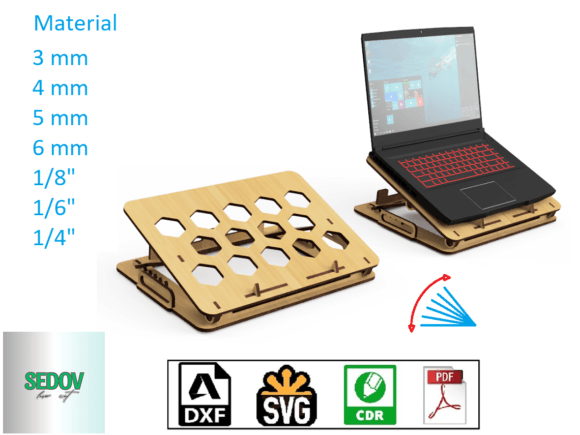
Beyond posture, thermal management is a frequent oversight in standard laptop accessories. Laptops generate significant heat, especially during rendering, video editing, or long coding sessions. Many enclosed stands trap this heat, leading to throttling and reduced performance. The template for this stand features large honeycomb-shaped ventilation holes. This geometric pattern is not merely aesthetic; it serves a functional purpose by maximizing airflow around the chassis. By allowing hot air to escape efficiently, the stand helps maintain optimal operating temperatures, extending the lifespan of your device's internal components.
Material Flexibility and Structural Integrity
One of the most compelling aspects of this design is its compatibility with various material thicknesses. The template is engineered to work effectively with materials ranging from 3 mm to 6 mm, as well as imperial equivalents like 1/8", 1/6", and 1/4". This flexibility allows users to choose materials based on their specific strength requirements and aesthetic preferences.
- 3 mm to 5 mm: Ideal for lighter laptops like ultrabooks or tablets, offering a balance between weight and stability.
- 6 mm (or 1/4"): Recommended for heavier gaming laptops or 17-inch models where structural rigidity is paramount to prevent flexing under load.
When selecting a material, consider the type of wood or acrylic available. Hardwoods like maple or walnut provide a premium look and high durability, while Baltic birch plywood offers excellent layer integrity for laser cutting. For those seeking a translucent or colorful option, acrylic sheets can be used, though they may require slightly different cutting parameters to avoid melting edges.
Portability and User Experience
In a world where remote work often means moving from a desk to a coffee shop or a client meeting, portability is essential. The inclusion of integrated handles in the design of this Laser Cut Laptop Stand Adjustable Tilt transforms it from a stationary accessory into a mobile workstation component. These handles are strategically placed to distribute weight evenly, making it effortless to carry the stand alongside your laptop bag.
This feature is particularly valuable for educators who need to set up a temporary station in different rooms, or for digital nomads who frequently change locations. The ability to quickly deploy a stable, ergonomic setup anywhere enhances productivity significantly. Furthermore, the modular nature of the assembly means that if a part gets damaged during transit, individual components can potentially be replaced without discarding the entire unit.
Customization and Aesthetic Integration
Unlike factory-finished products that come in limited color options, a DIY approach using this template offers complete creative control. You can paint the finished product in any color to match your existing decor or brand identity. For professionals who stream or appear on video calls, this allows the background to remain cohesive and professional. You might choose a matte black finish to blend into a dark room, a pastel tone for a softer aesthetic, or even stain the wood to highlight natural grain patterns.
The process of finishing the stand also adds a layer of personal investment. Sanding the edges smooth after cutting ensures a tactile experience that feels polished and high-quality. This attention to detail elevates the perceived value of the workspace, creating an environment that encourages focus and creativity.
Technical Specifications and File Formats
For makers and hobbyists, accessibility to the correct file formats is crucial for successful fabrication. This template package provides a comprehensive suite of files including SVG, DXF, CDR, and PDF formats. This variety ensures compatibility with almost all major laser cutter software, such as LightBurn, CorelDRAW, Adobe Illustrator, and Rhino.
- SVG and DXF: Vector-based formats ideal for precise cutting paths and ensuring scalability without quality loss.
- CDR: Specifically useful for users of CorelDRAW, a popular choice in the sign-making and fabrication industry.
- PDF: Useful for printing reference guides or for use in software that prefers vector outlines within a document format.
Before beginning the cut, it is advisable to review the size indications provided in the accompanying photos. Accurate measurement is vital to ensure the stand fits your specific laptop model. While the design accommodates most standard sizes, verifying dimensions against your device prevents issues with overhang or instability.
Real-World Performance and Limitations
While the Laser Cut Laptop Stand Adjustable Tilt offers numerous advantages, it is important to evaluate its limitations realistically. The stability of the final product depends heavily on the quality of the assembly and the material chosen. If using thinner materials like 3 mm, users should be cautious about placing heavy loads or leaning on the stand excessively. Additionally, the friction-fit joints common in laser-cut designs rely on tight tolerances; if the laser machine is not calibrated correctly, the pieces may fit too loosely or too tightly, affecting the locking mechanism.
Another consideration is the learning curve. Assembling a laser-cut project requires patience and basic tools. It is not an instant "out-of-the-box" solution. However, for those willing to invest the time, the result is a superior product tailored to their exact needs. The adjustment mechanism, while robust, may require occasional tightening if used extensively in high-movement environments.
Who Benefits Most?
This solution is particularly well-suited for several distinct groups:
- Freelancers and Entrepreneurs: Those who value a personalized workspace and want to optimize their health through better ergonomics.
- Makers and Hobbyists: Individuals who enjoy the process of building their own tools and appreciate the technical challenge of laser cutting.
- Small Business Owners: Professionals looking to create branded merchandise or unique gifts for clients using custom colors and finishes.
- Content Creators: Streamers and YouTubers who need a clean, adjustable backdrop that keeps their equipment cool during long recording sessions.
Long-Term Value and Sustainability
Investing in a Laser Cut Laptop Stand Adjustable Tilt also aligns with sustainable practices. By manufacturing the stand locally or at home, you reduce the carbon footprint associated with shipping heavy, bulky items across the globe. Furthermore, the durability of solid wood or high-quality acrylic means the stand is likely to last for years, far outperforming cheap plastic alternatives that crack or warp over time. The ability to repair or replace individual parts extends the lifecycle of the product even further.
Ultimately, this template represents more than just a collection of digital files; it is a blueprint for a better working environment. By combining thoughtful engineering with the freedom of customization, it empowers users to take control of their physical workspace. Whether you are upgrading a home office or equipping a small team, the practical benefits of improved posture, thermal efficiency, and portability make this a worthwhile addition to any tech setup.